
Seek AI
An AI-powered Computer Use Agents (CUA) that acts as a personal workplace assistant, executing tasks across enterprise applications on behalf of employees, be it user-led or autonomously.




What is CUA or computer use agents
CUA (Computer-Use Agent) is a type of Assistant that can use software the same way a human does - by seeing screens, clicking buttons, typing into forms, scrolling pages, and navigating applications. Instead of calling APIs directly, it interacts with and on the graphical user interface (GUI)

Journey to Seek CUA
Launched in late 2024, Seek started as an initiative to simplify whatfix flow creation through document recognition. Over time, it evolved into an AI-powered application capable of understanding intent, reasoning through tasks, and autonomously executing actions on behalf of users.
Early product understanding
Started with document-to-flow generation. The first model reached around 40% accuracy and generated up to 4 steps.
Improving accuracy
Built evals and improved AI understanding. Accuracy reached 60–65%, but GPT costs were high and ROI was low.
Model capability leap
Claude models and Whatfix flows helped Seek move closer to 90% accuracy for guided execution.
Trust before autonomy
Internal launch showed customers wanted autonomous execution with visibility, governance, and control.
Failures and learnings
I collaborated closely with engineers, product managers, and AI enthusiasts to explore the emerging space of computer-use agents. With no established interaction patterns to follow, I focused on reducing uncertainty, minimizing repetitive actions, and creating clear, intuitive experiences that users could trust.
2024 | Early product understanding
We started with a simple idea: help customers accelerate migration to Whatfix using the documents they already had. Early prototypes could generate flows from documentation with limited accuracy, revealing both the promise of the approach and the technical challenges that lay ahead. Despite the shortcomings, customer feedback reinforced that the problem was worth solving.
Initial exploration focusing on document upload and creating content as flows on a specified URL. Reached an accuracy of around 40%
Created new interaction states for CUA workflows where existing design patterns fell short.
Early to mid 2025 | Improved accuracy to around 65% and built a conversational experience
The biggest product and business challenge was improving the AI's understanding of the Whatfix ecosystem and content creation workflows. We addressed this by building evaluation datasets, expanding test coverage, and refining how the model interpreted customer documentation.
From a user’s perspective, the challenge was making the assistant feel less transactional and more collaborative. We focused on conversational continuity, enabling users to naturally refine ideas, ask follow-up questions, and execute tasks through an interactive dialogue.
Exploration focusing on providing better context to the AI and providing a conversational experience to the user
End 2025 | Introduction of improved base models and focus on executing tasks
Despite significant improvements in accuracy, the experience wasn't yet ready for design partnerships. We learned that trust is critical in AI products- especially CUAs, and early inaccuracies can quickly impact adoption. To improve reliability, we moved from Haiku to Sonnet and Opus for stronger contextual understanding, while focusing on two key experiences: user-driven task execution and unattended automation powered by FDE-defined master prompts
Seek evolved from creating Whatfix content to do tasks on behalf of the user based on prompts
Challenges we learnt
Designing Computer Use Agents presents three core challenges: building trust in autonomous systems, balancing autonomy with user control, and ensuring reliability in unpredictable environments. Unlike traditional software, CUAs must operate across dynamic interfaces, make decisions on behalf of users, and complete complex workflows with minimal supervision with provision for human in the loop. Creating successful experiences, therefore, required designing for transparency, control, governance and resilience at every stage of the interaction.
Strategy
Drawing from a year of experimentation, releases, and customer feedback, I partnered with the PM and lead engineer to define a strategy focused on earning trust through experience rather than promises. We broke the journey into three progressive phases: user-led → shared control between user and system → fully autonomous execution.
Seek strategy and breaking down into phases ans journeys
Seek playground - user led
Provide an experience that lets users explore the CUA application, build trust and confidence in SEEK, maintain a sense of control, and recognize the value of AI—turning them into advocates who are eager to adopt additional use cases.
Teach Seek
As users become more comfortable with Seek, we aim to reduce repeated prompting by enabling them to teach Seek like a colleague and gradually delegate tasks while staying in control.
End to end autonomous control
As trust and confidence in Seek increase, users can delegate repetitive, low-risk tasks for autonomous execution, with human oversight and governance built into the experience.
Key design interventions
Provision for users to playaround with seek
Seek phase 1 is designed as a playground that enables users to explore the CUA through experimentation, observation, and real-world interactions. By experiencing the technology firsthand, users can build confidence through demonstration rather than product promises. Seek ensures a governance and human-control layer that ensures transparency, oversight, and intervention when needed, fostering a responsible partnership between humans and AI.
To avoid overwhelming users with constant updates, I designed Seek to periodically shares a concise summary of past completed actions and outcomes instead of showcasing all steps upfront. This allows users to stay informed about progress without having to monitor the activity stream continuously.
These summaries serve two purposes:
For users: This provides a clear visibility into what has been completed and why.
For seek: This creates a lightweight record of past actions that can be referenced in future interactions, helping maintain context thereby reducing token usage,
This approach balances transparency with simplicity, ensuring users remain informed and in control while reducing cognitive load.
Designing beyond the happy path
Help build trust and control
Seek operates more like a human or a team ma. It observes what's currently on the screen, understands the context, and then decides what to do next.
To help users understand and trust the system, I made the AI's decision-making process visible through three simple stages:
Reference – Seek captures and analyzes the current screen.
Reasoning – Seek determines the next best action based on what it sees.
Activity – Seek performs the action or interaction.
By exposing these steps, the system becomes easier to comprehend and feels less like a black box. The process mirrors how humans observe, think, and act, making the system more believable and trustworthy.
Omnipresent assistant to help you with your tasks
I designed Seek around a simple idea: give context via a prompt or a document and get the task done.
Not every task requires a full-screen experience. Users simply want to delegate a task and continue working without switching context. To support this, Seek exists in two forms:
A lightweight command center for quick task delegation.
A full-screen workspace for tasks that had more visibility and controls
The command center enables users to trigger tasks from anywhere and continue their work uninterrupted, while Seek executes the task . For users who want to dive deeper, the full-screen experience provides access to task progress, history, and additional controls.
This approach keeps Seek accessible when needed while keeping the user's focus on their primary work.
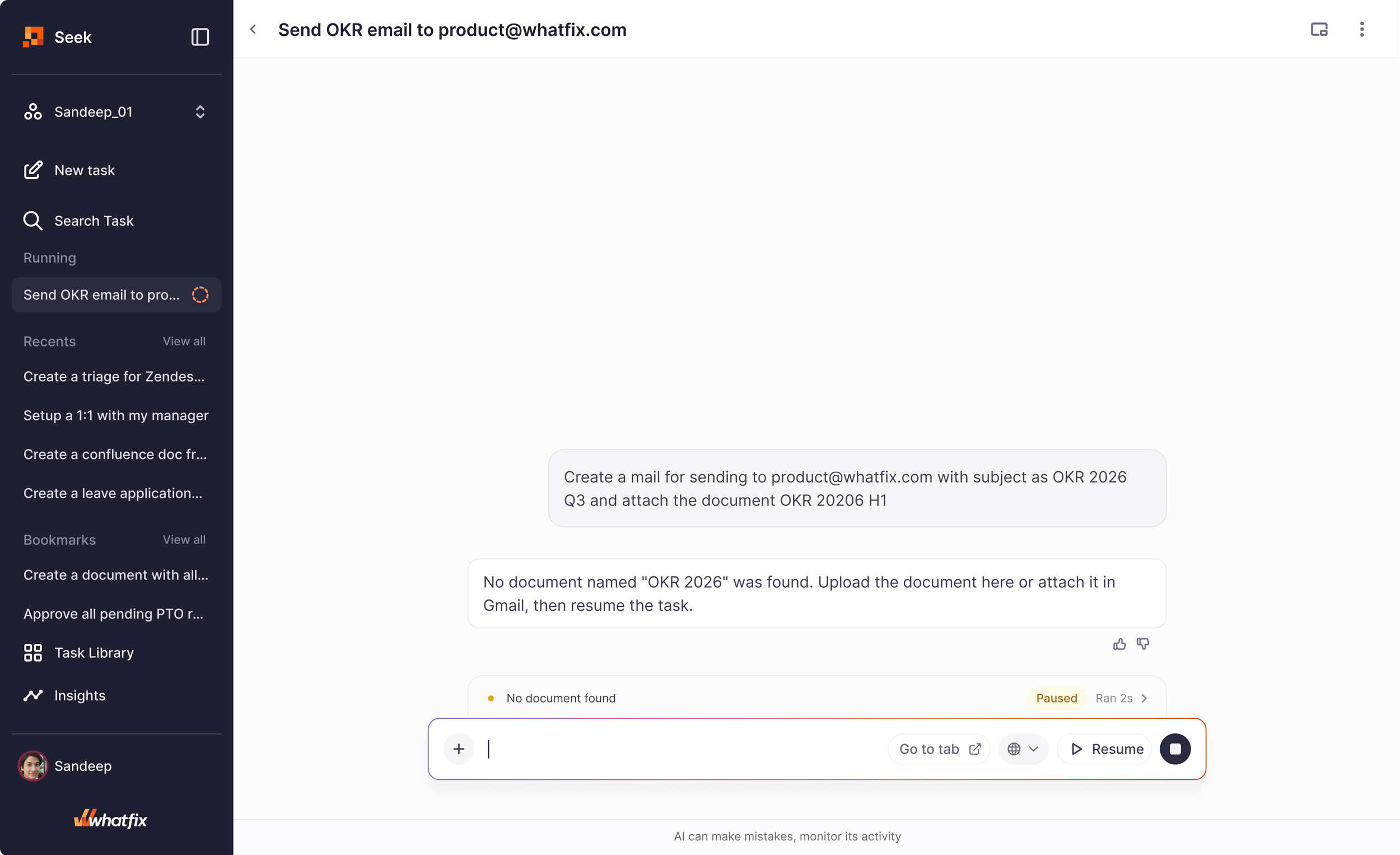
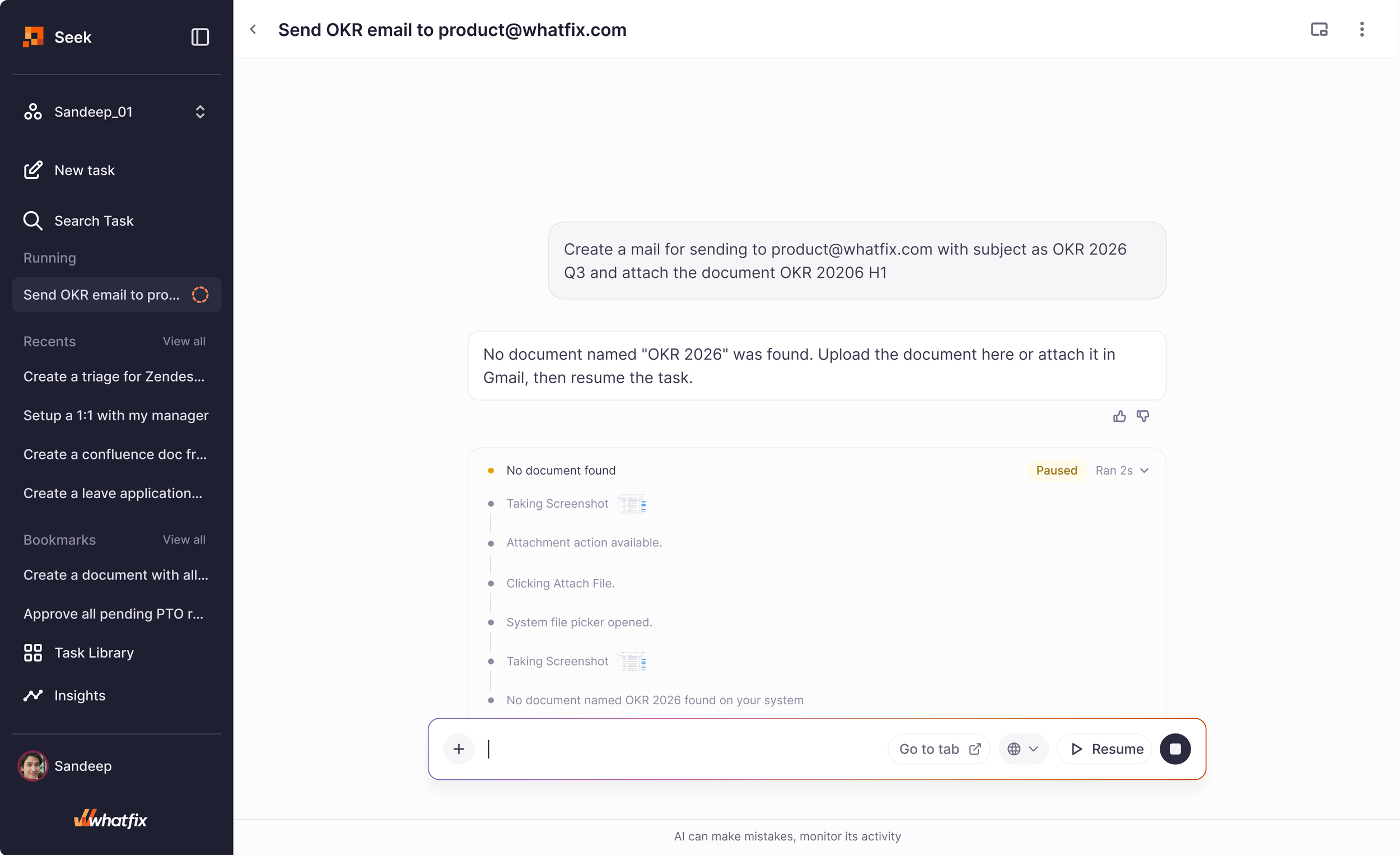
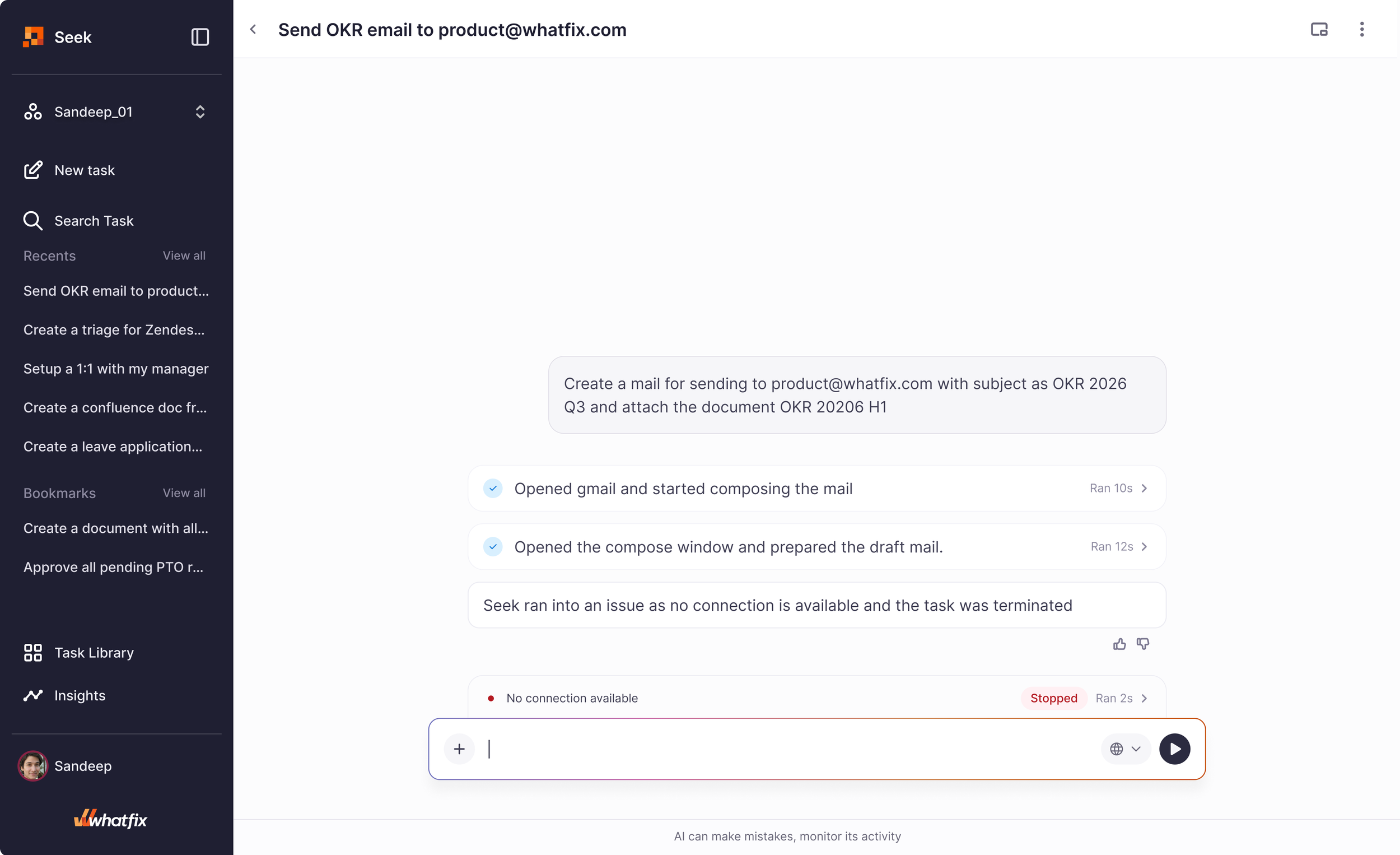
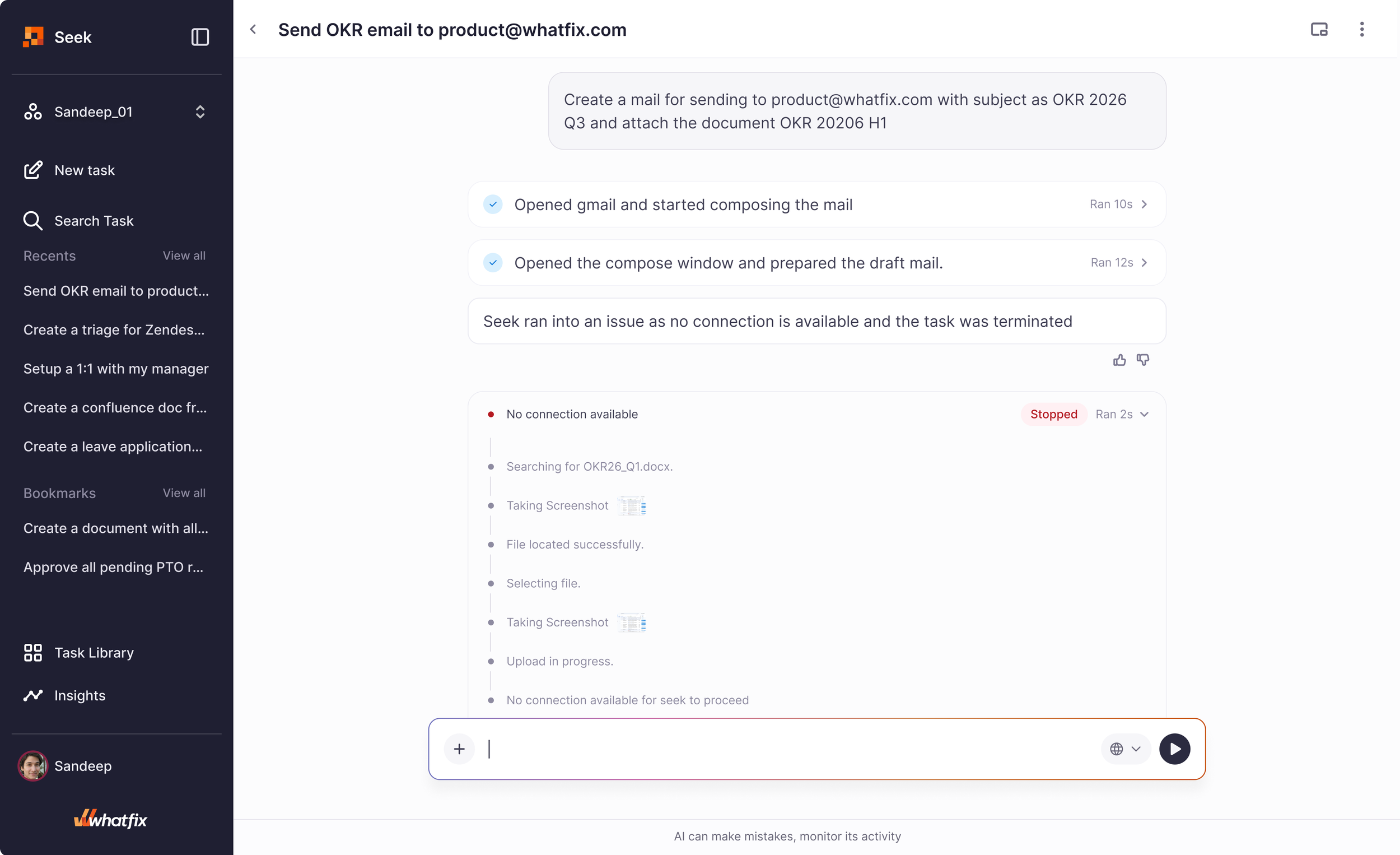
I moved beyond designing only for successful outcomes and focused on the moments when things don't go as expected. In an AI-driven system, building trust isn't just about showcasing success - it's equally about helping users understand, recover from, and report failures.
This meant designing clear states for pauses, interruptions, timeouts, and errors, while providing users with visibility into what went wrong and actionable paths to resolve issues. By making failures understandable and recoverable, the experience remained reliable even when the system encountered unexpected situations.
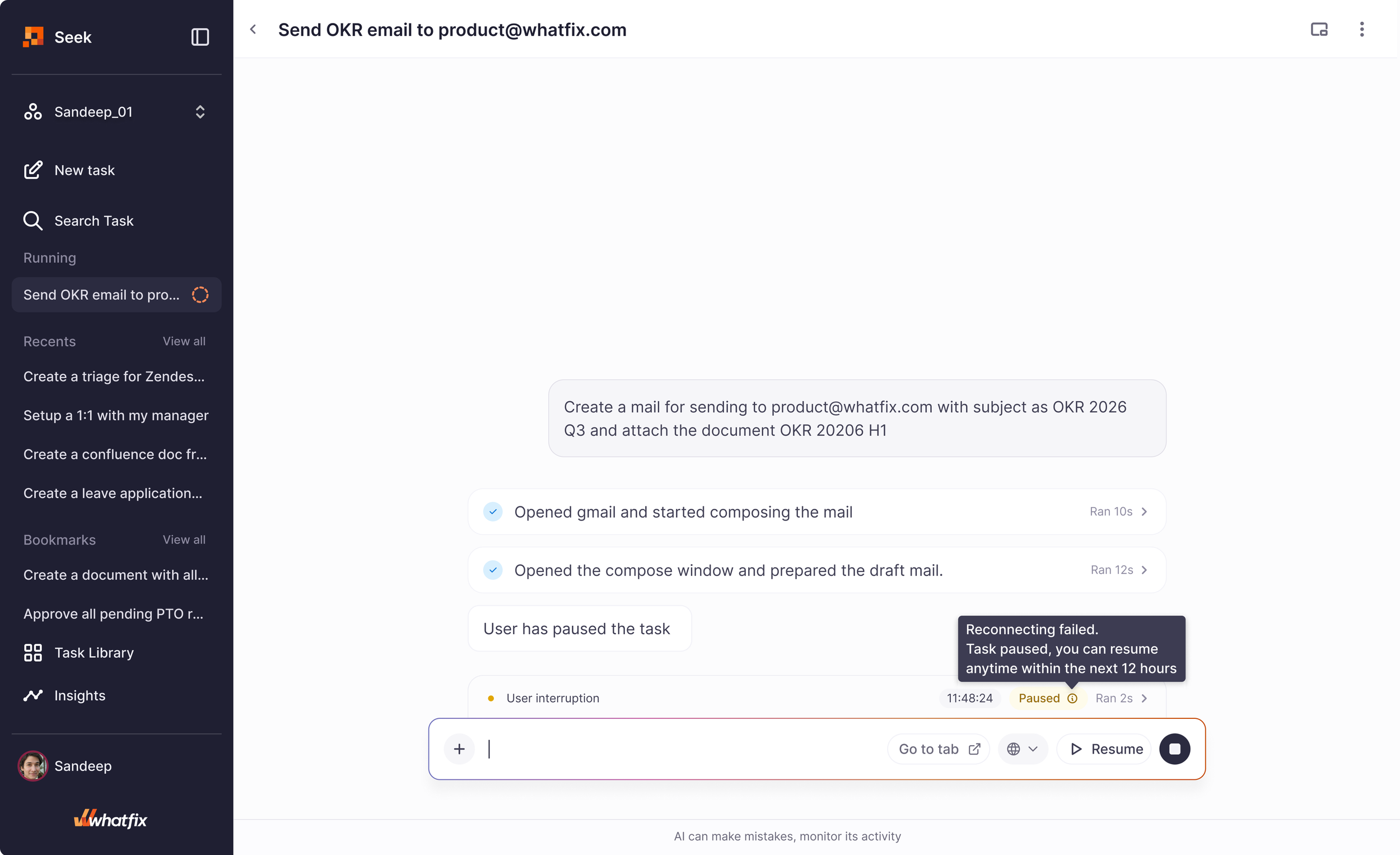
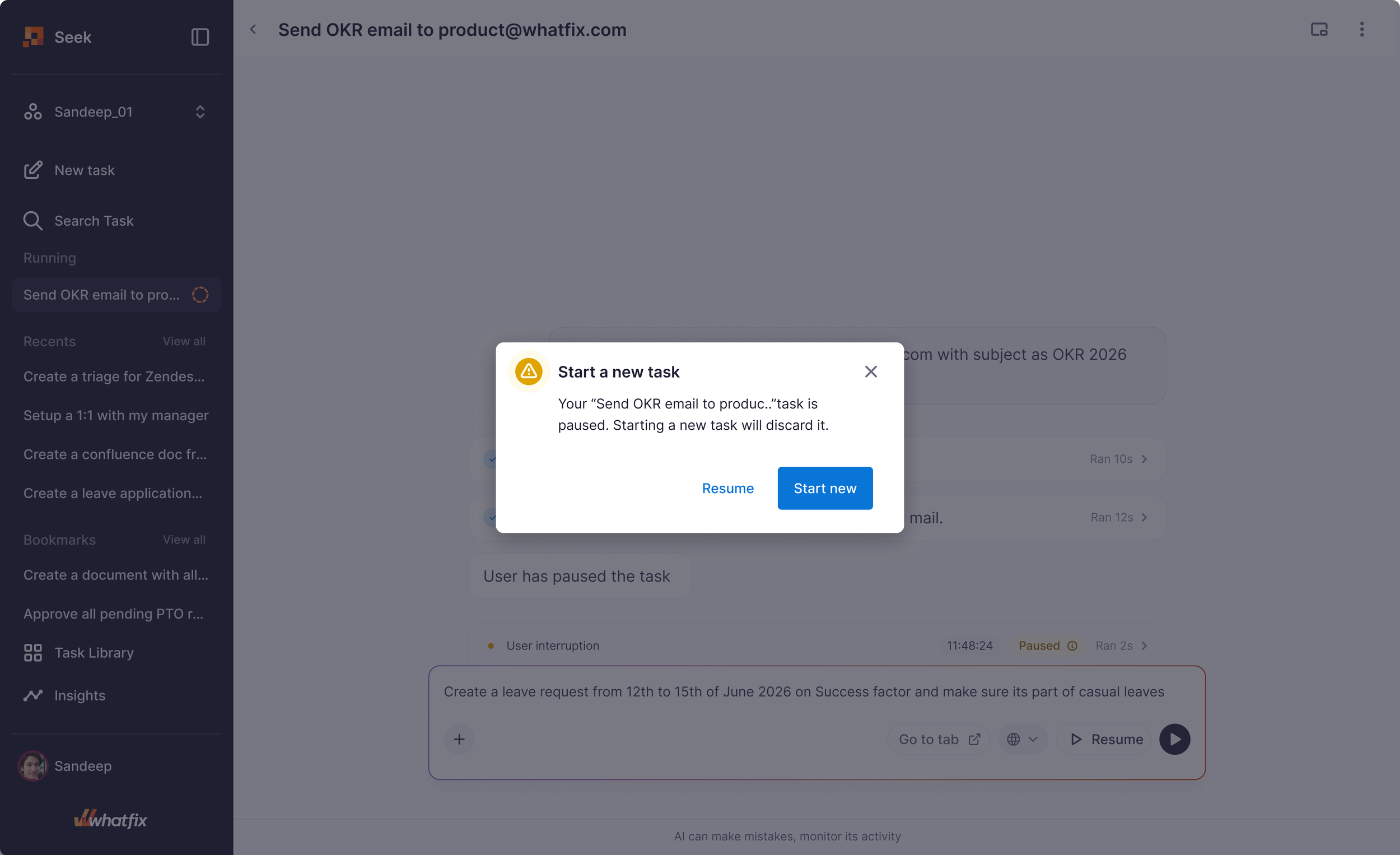
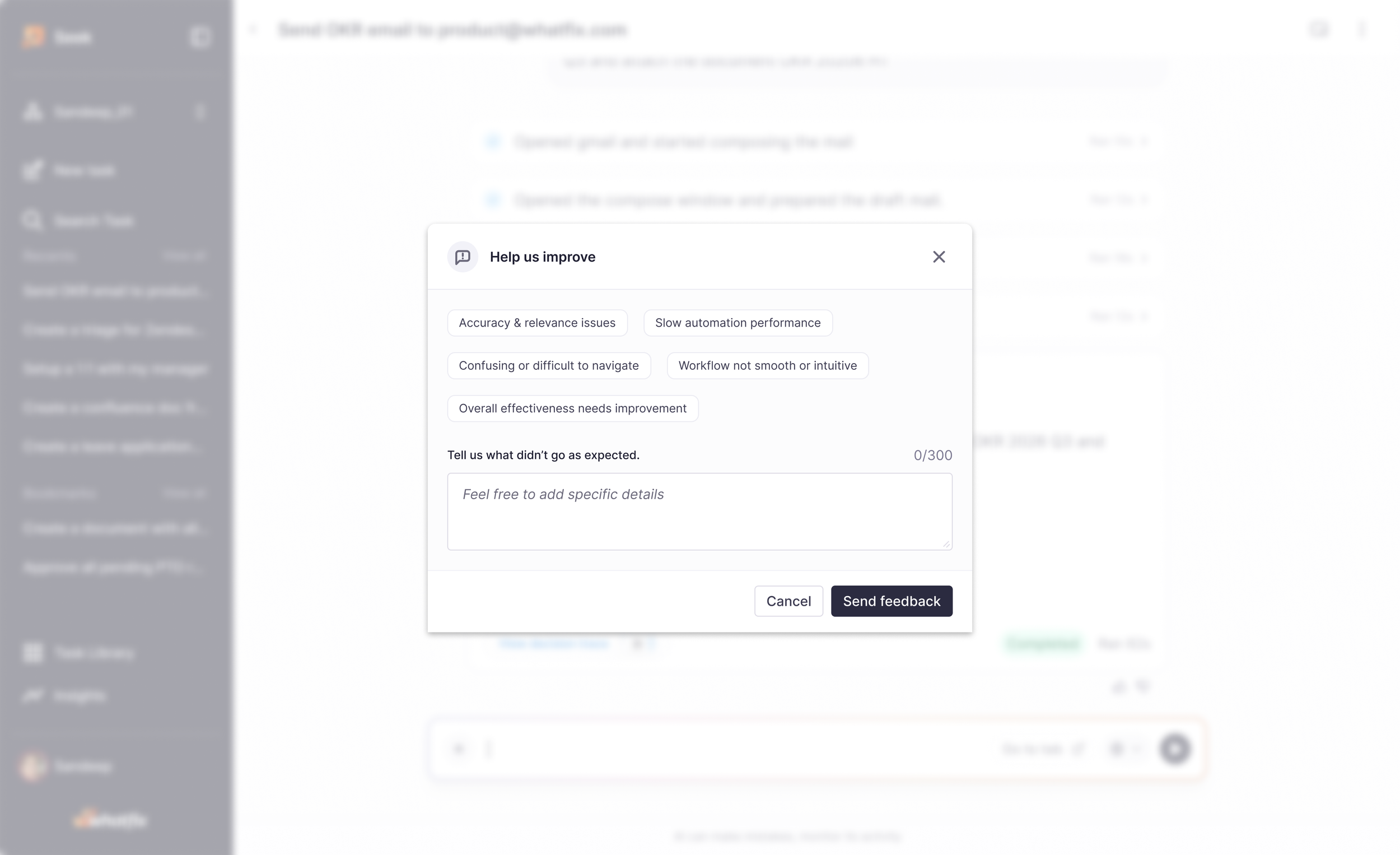
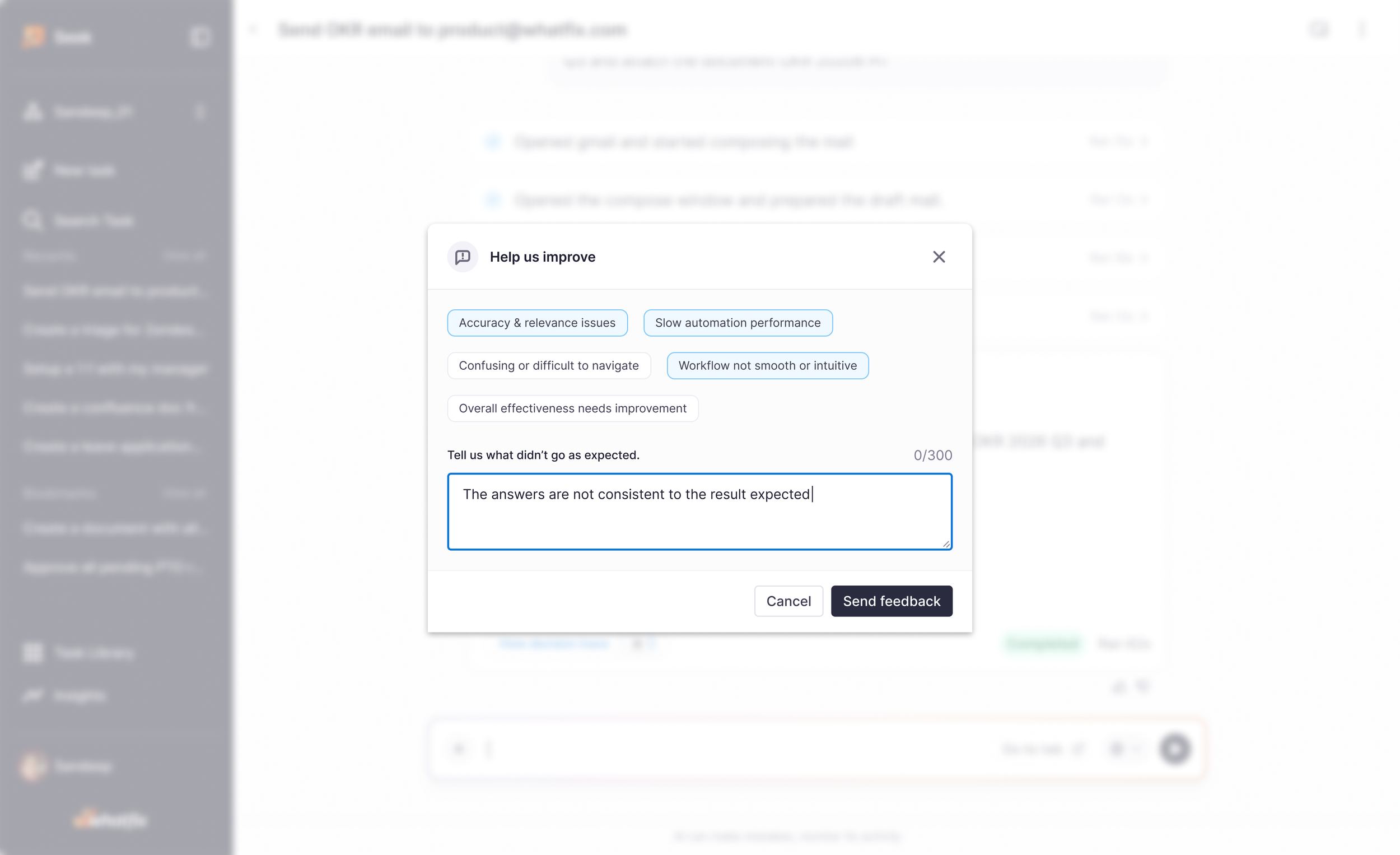
Seek AI - your personal task assistant
Teack seek
The success of Phase 1 — reflected in faster content creation velocity and reduced authoring time — created the momentum to rethink the end-user experience at a larger scale. This led to the strategy of unifying all end-user interactions into a single widget ecosystem called HUB.
Instead of exposing users to multiple disconnected widgets across the application UI, HUB introduced one centralized entry point that surfaced support, guidance, tasks, chatbot integrations, and AI-powered assistance contextually within the flow of work.
Challenges we addressed
The existing end-user experience exposed users to multiple Whatfix widgets - such as Self Help and Task List — each competing for attention alongside other external widgets in the application interface.
What worked - whats next ?
Content authors responded positively to the revamped widget system, sharing that the experience now feels on par and in some cases better, than competing products in the market. The structured approach, improved clarity, and unified HUB strengthened both usability and perception. This shift also opened new conversations around the future of AI-driven DAP experiences and adaptive guidance.